Showing posts with label Pentaho. Show all posts
Showing posts with label Pentaho. Show all posts
Monday, September 12, 2022

Monday, September 5, 2022
Make Java to Handle Only Business Logics (4) - How about Using an ETL Process in Place of Spring Boot Batch?
The below are the employee records associated to the department table via department number.

The department table comes here. Please pay attention to the record with grey background, which is not valid any more as the department's name was changed effective as of Jan. 1, 2011.

The two source tables will be imported and re-organized as the master table shown as below. Retail Sales becomes the new new name of department No. 2, instead of Online Sales.

To fulfill this purpose, I create a job flow as below with one transformation and a mail step. The transformation takes on the major work needed to be done from extract through transform to load. The mail step sends an email to the support team when the process fails due to an unexpected error.
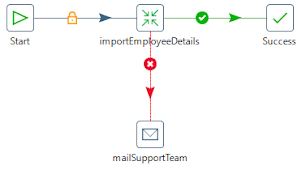
The major part is the transformation which extracts data from [Employee] table and [Department] table, filters out invalid records, joins the two data sets and then loads the clean data into [EmployeeDetails] table.

Spoon provides a graphical interface where you can configure log setting. Double click [importEmployeeDetails] transformation on the job design window and the setting dialog pops up. Go to [Logging] tab and specify a log file as well as the preferable log level.
Here is an example of the log with basic level for the above transformation.

With plenty of in-box functionalities, you can develop an ETL process in a stress-free way to import employee master data into your application. The process is visualized on Spoon and each of steps is visible to you during execution.
Monday, May 11, 2020
Pentaho - Java Filter
Pentaho Kettle's support for Java and JavaScript greatly increases its flexibility to deal with various transformation needs. Here we take a look at the Java Filter step that you can write a Java expression to filter data records.
The overview transformation diagram is illustrated as below.


We want to pick out salesman's records. To make the condition a little bit more complicated, we want SAL to be not less than 1500 as well.

The matching data flows to "toFile" step, and the non-matching data goes to "toDummy" step.
Be noticed that non-matching destination step must be specified; otherwise you will get "failed to initialize" error when you try to execute the transformation.
Save the transformation and execute it. You will see the filter results shown by the below tables.
"toFile" destination step:

"toDummy" destination step:

Additionally, conditional operator (? :) can be used for sure.
E.g. (DEPTNO == 10) ? Boolean.TRUE : Boolean.FALSE
For dates comparison, use compareTo() method, for example, Date1.compareTo(Date2).
Subscribe to:
Posts (Atom)
Machine Learning - Iris Classification
Last updated on: To develop a machine model in response to a business case, we easily think of the following process. In general, we col...


