Thursday, September 28, 2023

Friday, September 1, 2023
Machine Learning - Build and Compare Regression Models
This is a continued blog following Build And Compare Classification Models. We are going to build and compare a bunch of regression models in this post.
As for the program, we use the same mechanism. A factory class named RegressorFactory takes on tasks such as instantiating a model and fitting the model and predicting and evaluating the model.
Function CompareRegressionModels() takes the responsibility of implementing the work flow.
Along with the score (Coefficient of determination) provided by a model itself, root mean squared error (RMSE) is another indicator chosen to evaluate the models. You can find them on the comparison graph.
A solid circle represents a model on the chart. The score is displayed near the circle. The RMSEs of the training data and the test data stand for X, Y axis, respectively.

make_regression Dataset
Another example for California Housing dataset.

California Housing
Models to Be Compared
The regression models are also administered in the table ModelList with Category set to Regression, as shown on the screenshot below.
PreCalc indicator is set to 1 if the model requires polynomial calculation, otherwise set to NULL.
The pair of Parameter and Value define the parameters passed to the model in its creation. The table structure allows you to add up to unlimited parameters. What if we specified a duplicate parameter? The first one will be picked out and passed to the model.

Dataset
Dataset should be loaded into table DatasetReg. Please make sure you only add the feature columns and the label column to the table and place the label column in the last.
The sample is a dataset generated by make_regression() method.

make_regression Dataset
Main Flow
The main flow is realized in function CompareRegressionModels(), shown in the diagram below.
But one thing we need to pay attention to, some models such as Lasso, Polynomial and Ridge require transforming the input data with polynomial matrix before it is fed into the models. So, after standardize the input data, we call PolynomialFeatures() to prepare polynomial calculation matrix, then pass the standardized data to the calculation matrix and get the output. The output will be passed to that group of models. As a result, the flow becomes slightly different.

How to Add a Model?
In case you want to add more models, you can insert the corresponding records into the table ModelList using SQL scripts, or whatever database tool. And please make sure the new model has been included in class RegressorFactory. Otherwise, you will get a warning message saying the model is not implemented as of now.
insert into modellist values('Multiple', 'Regression', null, '', '');insert into modellist values('Polynomial', 'Regression', 1, '', '');insert into modellist values('Ridge', 'Regression', 1, 'alpha', '0.1');insert into modellist values('Ridge', 'Regression', 1, 'random_state', '123');

The newly added models pop up on the graph.

make_regression Dataset
How to Switch the Dataset?
The program fetches data from table DatasetReg, so the data must be moved into DatasetReg. Here is an example for your reference.
- Create an external table named Dataset_Housing.
create table Dataset_Housing (MedInc number,HouseAge number,AveRooms number,AveBedrms number,Population number,AveOccup number,Latitude number,Longitude number,Price number)organization external(type oracle_loaderdefault directory externalfileaccess parameters(records delimited by newlinenobadfilenologfilefields terminated by ',')location ('cal_housing.csv'))reject limit unlimited;
- Drop table DatasetReg.
- Create table DatasetReg from Dataset_Housing.

Relook at Mountain Temperature Prediction
GradientBoostingRegressor is used for mountain temperature prediction in the blog Machine Learning - Build A GradientBoostingRegressor Model. In effect it overfit the training dataset. So we run all these regression models on the same dataset this time.
As you can see from the evaluation graph, DecisionTreeRegressor and Polynomial and RandomForestRegressor and Ridge tend to be overfitting as well for this particular predictive case.

Reference
Python Statistics & Machine Learning Mastering Handbook Team Karupo
Machine Learning - Build A GradientBoostingRegressor Model
Machine Learning - Build And Compare Classification Models
Appendix: Source Code
Machine Learning - Build and Compare Classification Models
When it comes to machine learning, there are a wide range of models available in the field. With no doubt, it will be a huge project in terms of efforts and time if someone tries to walk them through. So I've been thinking it may be a good idea if we get them work first with example Python codes. As to concept, underlying math, business scenarios, profits, concerns etc., we can pick up with more researches later when we work on a specific business case. The merit to do this is that we get to know, these models, probably just a little, and we can gain hands-on programming in the first place. It would lay a foundation for further development as needed.
I happened to read a book, Python Statistics & Machine Learning Mastering Handbook, authored by Team Karupo. The book introduces a bunch of models with concise texts and examples covering supervised and unsupervised and deep learning estimators.
Inspired by it, I planned to build a series of models at once that can be flexibly selected and visualize their performance on the same graph. Moreover, I would like to approach it from the engineering angle and make the process as simple as we feed the input dataset, then get the visual evaluation results, like the graph shown below. (Please be noted that the process of developing and tuning a model is not the subject we are going to address here. If you are interested in that, please check out Machine Learning - Build A GradientBoostingRegressor Model for more details. )

For each model, we'll do the prediction for both the test data and the training data, and calculate their accuracy scores as well. Then display them on the chart where a model relates to a solid circle. X axis represents the accuracy score for the training data, whereas Y axis represents the accuracy score for the test data.
At the same time, use the score() method provided by the model to get the score for this specific case, texted right above the circle.
Models to Be Compared
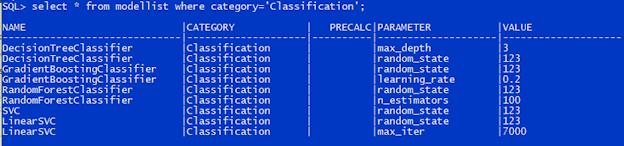
Models to be compared are stored in the table ModelList, as shown below.
Name field bears the name of a model.
Category field defines which group the model belongs to, either Classification or Regression.
Parameter and Value fields define parameters to be passed to the model in its creation. Parameter field holds the name of the parameter, and Value field carries the value associated with that parameter. You can add as many parameters as you need for a model. On the other hand, if you don't specify any parameters for a model, the model will take the default parameters.
PreCalc is an indicator showing if we need to carry out extra calculations on the input data before it is passed to a model. For example, we should use a polynomial to transform the data before feed it into Lasso regression model. We'll discuss it more in another blog Machine Learning - Build And Compare Regression Models.
Dataset
The dataset is kept in a table called DatasetCls, which consists of only the feature columns and the label column. Any descriptive columns have to be removed. Additionally, the label column has to appear last. DatasetCls can be either a normal table or an external table.
That is all, we don't have more rules for it.

Dataset Generated by make_classification()
Main Flow
The main flow, illustrated on the following diagram, is implemented in function CompareClassificationModels() that you can find in the latter section Appendix: Source Code.
Please be noted that we'll standardize the training data and the test data before feed them into the models.

Main Flow
How Are Models Created?
Model instantiation is implemented in class ClassifierFactory packaged in modelfactory.py. Please refer to Appendix: Source Code section.
The factory method newclassifier() creates and returns a model with specified parameters. The models defined inside the class are all the classifiers that this factory can produce so far. You can add or delete models based on your needs.
The method execute() will call fit() and predict() and score() on the model. Additionally, it will call accuracy_score() to evaluate the model's performance on the given datasets.
How to Add a Model?
This is pretty straightforward. We can get it done by appending a record to the table ModelList. For example, we would like to add LogisticRegression to the list and specify random_state parameter at the same time. So we can execute the following SQL statement.
insert into modellist values('LogisticRegression', 'Classification', null, 'random_state', '123');

Then we re-run the program, as you can see, LogisticRegression appears on the graph.

How to Switch the Dataset?
For example, we would like to use the wine dataset coming with sklearn. If we have the csv file on hand, we can create an external table using the SQL script below. If the script doesn't work in your environment, please double check if your csv file has the right encoding.
create table datasetcls (fixed_acidity number,volatile_acidity number,citric_acid number,residual_sugar number,chlorides number,free_sulfur_dioxide number,total_sulfur_dioxide number,density number,pH number,sulphates number,alcohol number,quality number)organization external(type oracle_loaderdefault directory externalfileaccess parameters(records delimited by newlinenobadfilenologfilefields terminated by ';')location ('winequality-red.csv'))reject limit unlimited;

Wine Dataset
We can do the same for Iris dataset.

Iris Dataset
For the dataset processing, we used the hard-coded parameters. Obviously there is more room for improvements. In response to needs in the field, surely we can add more customized functionalities.
Additionally, the similar work for the regression models will be undertaken and summarized in another blog.
Reference
Python Statistics & Machine Learning Mastering Handbook Team Karupo
Machine Learning - Build A GradientBoostingRegressor Model
Machine Learning - Build And Compare Regression Models
Appendix: Source Code
CompareClassificationModels()
Wednesday, August 16, 2023
Python - Class
Class is a very important feature in Python, which gives Python the capability of supporting OOP. A class is declared with the keyword "class". Let's take a brief tour of it in this blog.
Noted that Jupyter Lab is used for demonstration.
A Simple Class
Let's start with a simple class, which contains only one method. After instantiated the class, we can simply call the class method.

A Class with __init__() Method
We can add an __init__() method into our class to do some initialization work while an object is created.

Python doesn't support overloading by default. So we can declare only one __init__() method. To be more precise, we can declare over one __init__() methods, but only the last one is valid.
How to overload methods? There are several ways to achieve this, for example, we can use multiple dispatch decorator, assign a default value to an argument, or use dynamic arguments etc. Please check out the reference The Right Way To Overload Methods and Operators In Python for more details.
Class Variable and Instance Variable
A class variable belongs to the class, it is shared cross all instances created from this class. On the contrary, an instance variable belongs to that particular instance.

What if we define another string class variable named by "_anothermsg"? Something interesting happens.
When object "hp" is created, "_anothermsg" is assigned with a string "Hi Python". Later in the creation of object "sy", it is given another string "Hello". However, this doesn't update "_anothermsg" in object "hp". Simply put, "_anothermsg" behaves like an instance variable.

This doesn't mean something wrong. Python is born with its own philosophy, having its conventions. Overall, Python has very loose constraints.
If we simply look at this from the perspective of pass-by-reference or pass-by-value, list is pass by reference, string is pass by value, whereas slice of a list is pass by value, meaning a copy of that slice is created.

Private Variables
Python doesn't have private keyword to declare a variable. If a variable or method is named with a leading underscore "_", it should be treated as a private part in practice.
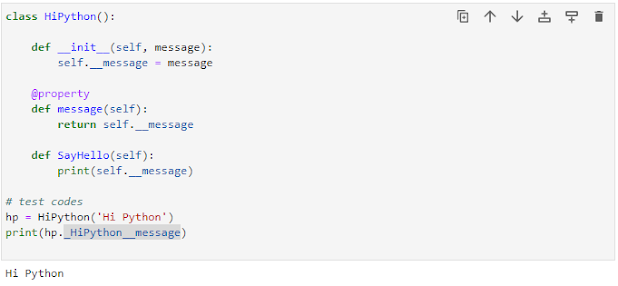
In the meanwhile, if we define a variable preceding with double underscores "__", the variable becomes inaccessible from outside the class, as illustrated by the following example.

Of course, we can use property or getter method to access it, which are described in the next section.
In nature, a variable prefixed with "__" is replaced with "_classname__variablename" in Python, for example, "__message" is replaced with "_HiPython__message".
Property
A property is defined by using property decorator "@property". It provides access to a class or an instance variable.

Getter and Setter
First, we can implement these by using methods. As shown in the example below, "set_message()" method converts a string into uppercase and assign it to the instance variable "_message", whereas "get_message()" method returns "_messasge".

We can also do this in a more graceful fashion, using a combination of property and setter.

One of the merits we have a setter is that we can do some transformations before the assignment.
Inheritance
Inheritance is realized by placing the super class's name inside the parentheses when we define a sub class. Multiple inheritance is also supported by Python.
"SubPython" is derived from "HiPython" in the following example.

Can a derived class add its own __init__() method? Yes, it is doable. In the below example, the sub class declares a __init__() method that calls the super class's __init__() within it.

Polymorphism
Although it is practicable to overload operators in Python, we shed light on class method here.
For overloading, we can find workarounds even Python doesn't implement it as a default feature.
For overriding, let's have a look at the example below. SayHello() method is defined in the super class and re-defined in the derived class.

Inside SubPython.SayHello(), we can also call the super class's method through super().
super().SayHello()orsuper(SubPython, self).SayHello()

Dataclass
A dataclass is specialized in holding and representing data. It is declared by using @dataclass decorator, as a consequence, some special methods such as __init__() and __repr__() etc are automatically added into the class.
Here is a dataclass example using default __init__() and __repr__() methods.

We can also define our own __init__() and __repr__() methods, overriding the original ones, as shown in the below screenshot.

Reference
Python Tutorial by Guido van Rossum and the Python development team
Getters and Setters: Manage Attributes in Python
Saturday, August 12, 2023
Tuesday, August 8, 2023
Friday, August 4, 2023
Subscribe to:
Posts (Atom)
AI Tools - AntiGravity・Kiroを使ってみよう
Last updated on: AIの開発は加速しています。産業への応用も繰り広がり、手軽に使えるようになりました。システム開発においては、具体的な技術には差異がありますが、パターン化しやすい特徴があり、AIの適応性が優れているとも言えるでしょう。ここでは、AIツールを使ってア...

-
 SQL modeling in Oracle provides a way to do calculations like a spreadsheet does. It leverages the data processing power of Oracle database ...

